ComfyUI.Tokyo
複数条件の場合はキーワードの間にスペースを入れてください。例 ksampler controlnet
Qwen_8steps_image 画像生成の女王Queenでしょうか?🖥️🚨
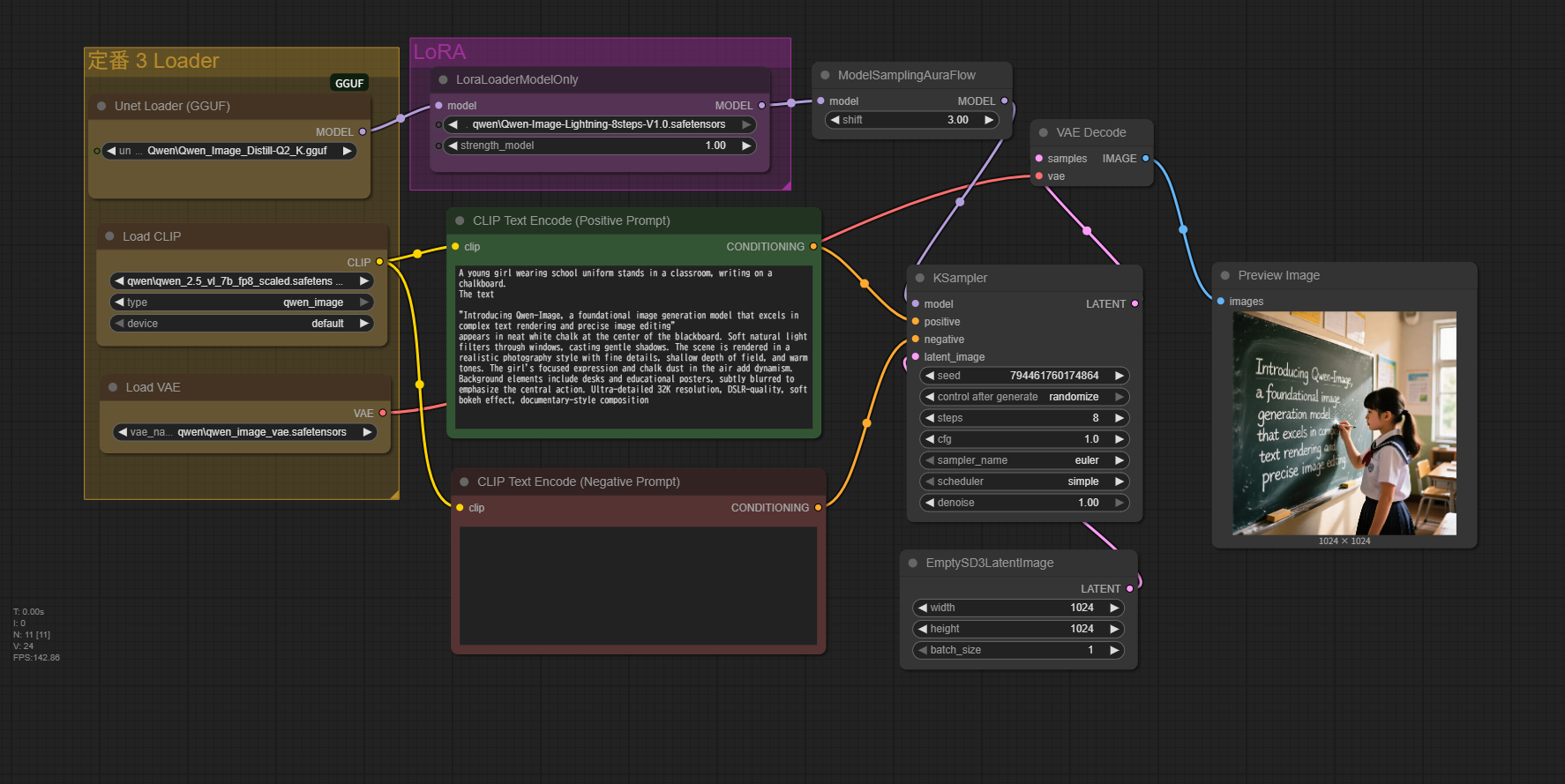
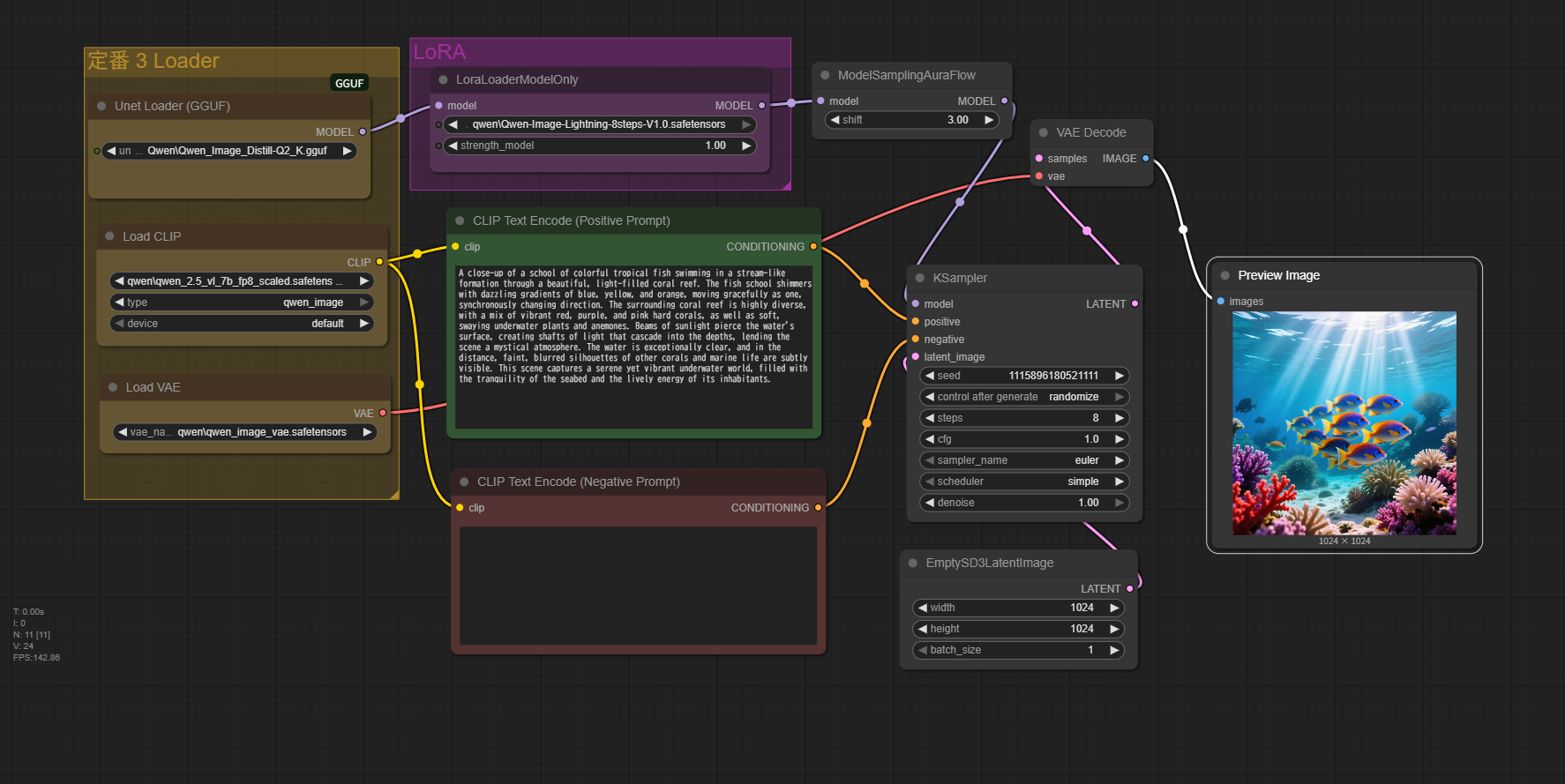
- Qwen-Image GGUF の採用
- GGUF形式のUnet Loader を使っており、軽量化・最適化されながらも Qwen-Image の高性能をそのまま引き出せます。
- Qwen-Image は文字生成や精密な構図、質感表現に強いモデルで、特に黒板の文字や細かいチョークの粉まで鮮明に描写可能です。
- GGUFはCPU/GPU両対応でメモリ効率が良く、速度と画質の両立が可能。
- LoRAでの特化チューニング
- LoRA (`Qwen-Image-Lightning-8steps-V1.0`) を組み込み、わずか8ステップ程度の短時間で高品質生成を実現。
- LoRA Strength=1.0 でモデル全体の描写傾向をしっかり反映させ、テーマや構図の安定感を高めている。
- Prompt設計と CLIP Text Encode
- ポジティブプロンプトに詳細な情景描写(被写体、動作、環境、光源、画質指定)を盛り込み、Qwenの強みをフルに活かす。
- 「fine details」「shallow depth of field」「soft natural light」など写真用語を多用し、リアルかつ映画的な画作りを誘導。
- ネガティブプロンプトが空欄なのは、モデル自体が非常にクリーンで不要な生成物が少ないため。
- ModelSamplingAuraFlow の利用
- Sampler前に ModelSamplingAuraFlow を通すことで、LoRAやモデル特性をより滑らかに統合。
- shift値 3.00 は出力の立体感や質感強調に寄与し、エッジの精細感と空気感の両立を実現。
- VAEの適切な選択
- Qwen専用のVAE(`qwen_image_vae.safetensors`)を使用することで、発色・階調・シャープネスがモデル設計通りに出る。
- VAEを汎用ではなくモデル専用にすることで色ムラや暗部潰れが抑えられ、黒板の質感や室内の光が自然に再現される。
- 短ステップでも高精細
- KSampler設定で steps=8、CFG=1.0 と低めながら高画質を維持できているのは、LoRAとモデルのマッチングが完璧だから。
- Euler + denoise 1.00 により、短時間でもディテールが失われない。
このワークフローの総合特徴
- Qwen-Image GGUF + 専用VAEで超高精細かつ文字にも強い生成。
- Lightning LoRAで短ステップ高速化と高品質を両立。
- 細密なプロンプトで被写体・環境・光・質感を精確にコントロール。
- AuraFlowでLoRA・モデルの融合精度を向上。
- 低ステップでも破綻しないほどモデル性能が高い。
models
Qwen-Image-Lightning-8steps-V1.0.safetensors
qwen_2.5_vl_7b_fp8_scaled.safetensors
Workflow(GGUF)
Prompt
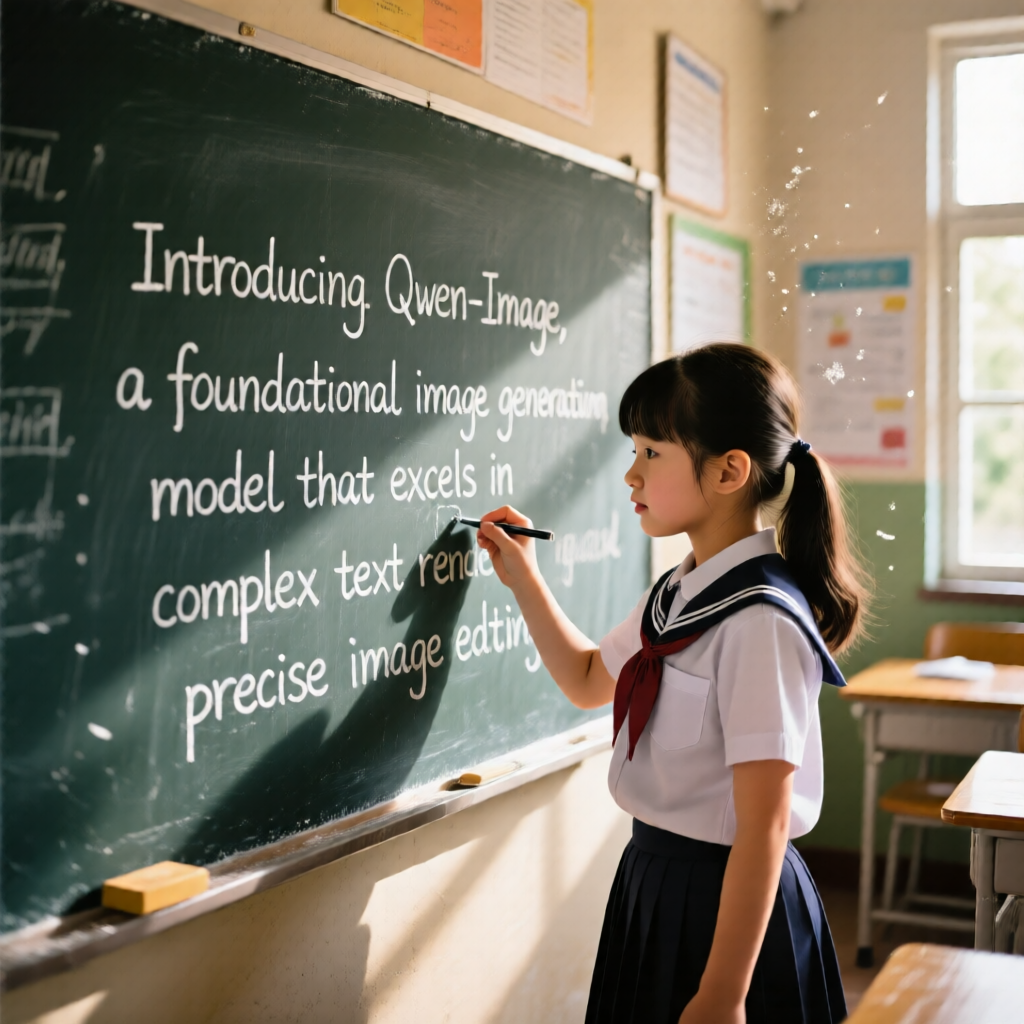
A young girl wearing school uniform stands in a classroom, writing on a chalkboard.
The text
"Introducing Qwen-Image, a foundational image generation model that excels in complex text rendering and precise image editing"
appears in neat white chalk at the center of the blackboard. Soft natural light filters through windows, casting gentle shadows.
The scene is rendered in a realistic photography style with fine details, shallow depth of field, and warm tones.
The girl's focused expression and chalk dust in the air add dynamism.
Background elements include desks and educational posters, subtly blurred to emphasize the central action. Ultra-detailed 32K resolution, DSLR-quality, soft bokeh effect, documentary-style composition
Workflow(GGUF)
Prompt
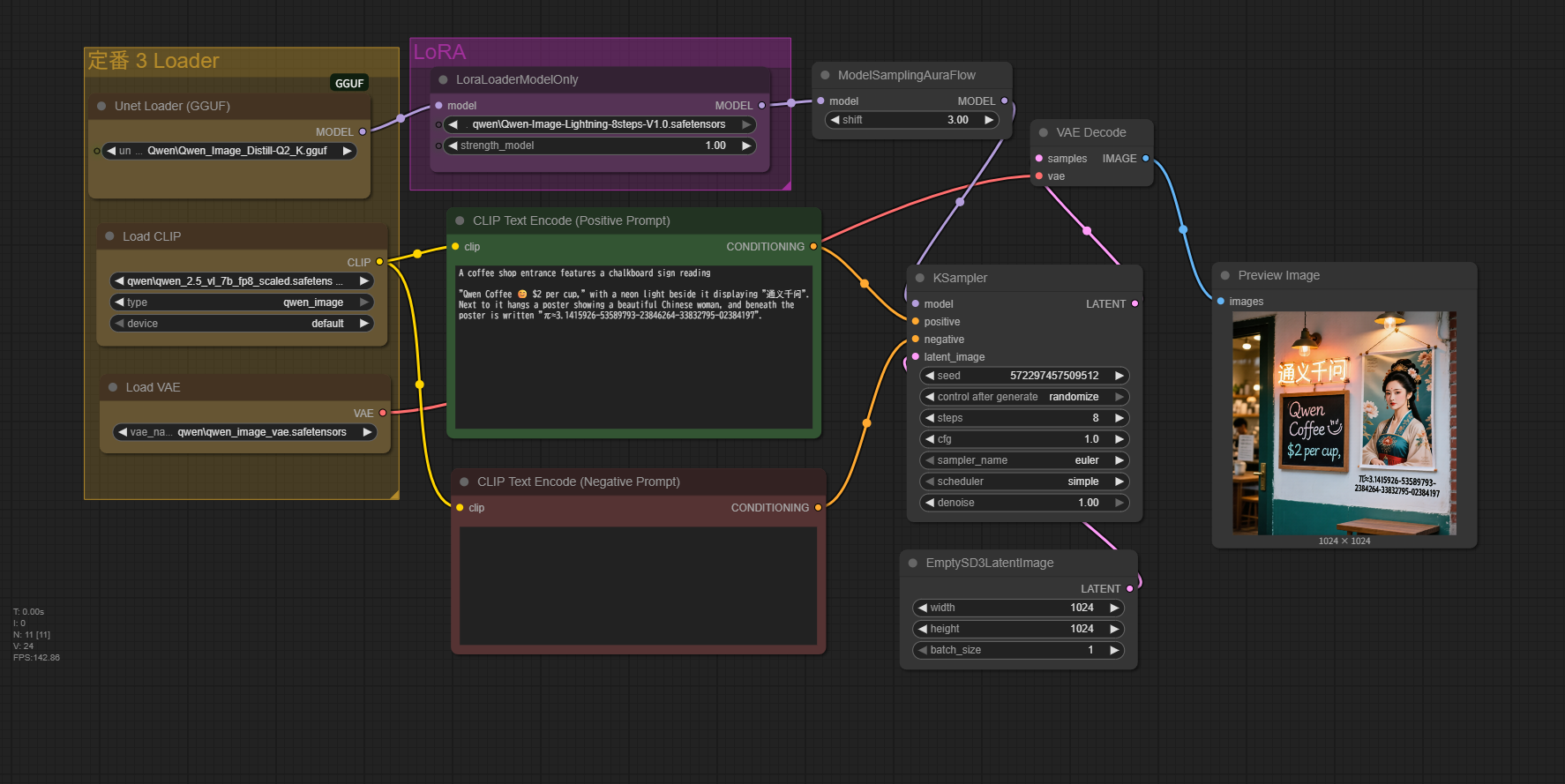
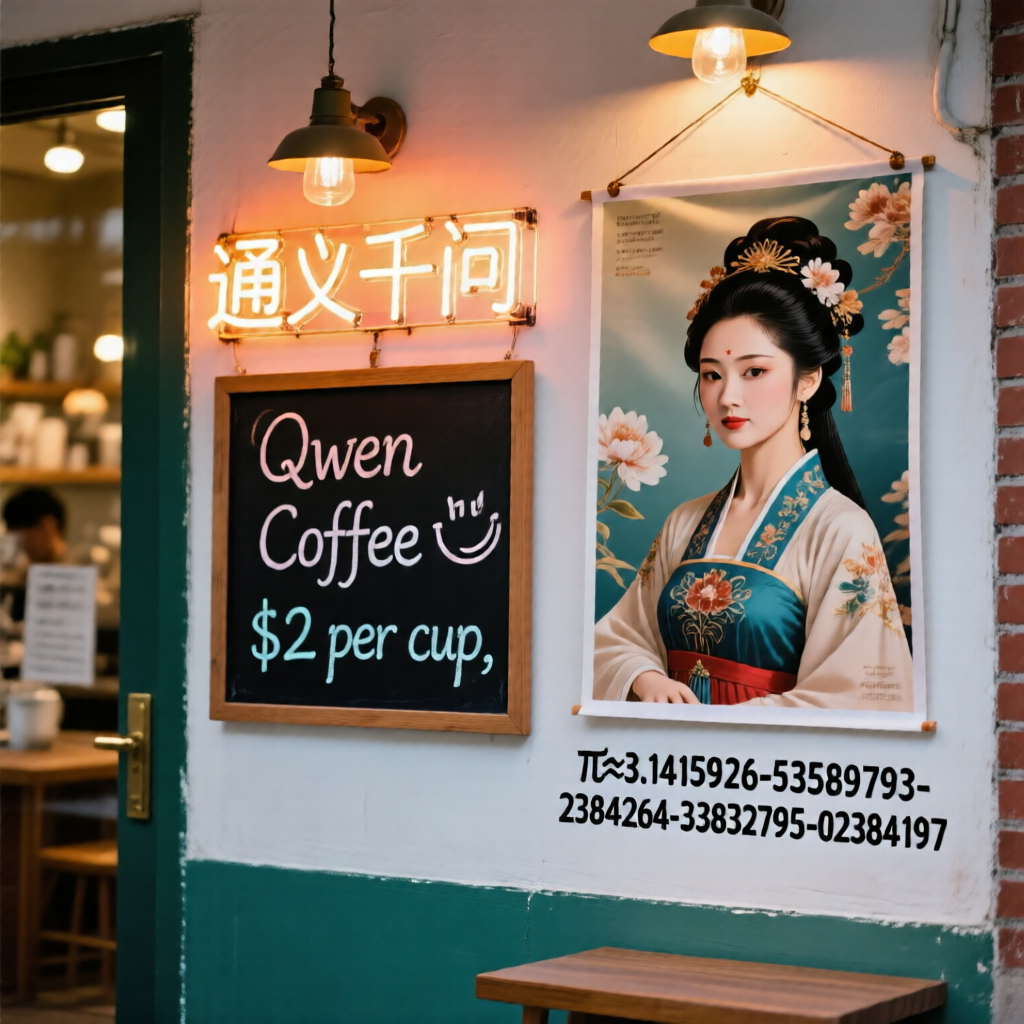
A coffee shop entrance features a chalkboard sign reading
"Qwen Coffee 😊 $2 per cup," with a neon light beside it displaying "通义千问". Next to it hangs a poster showing a beautiful Chinese woman, and beneath the poster is written "π≈3.1415926-53589793-23846264-33832795-02384197".
Workflow(GGUF)
Prmpt
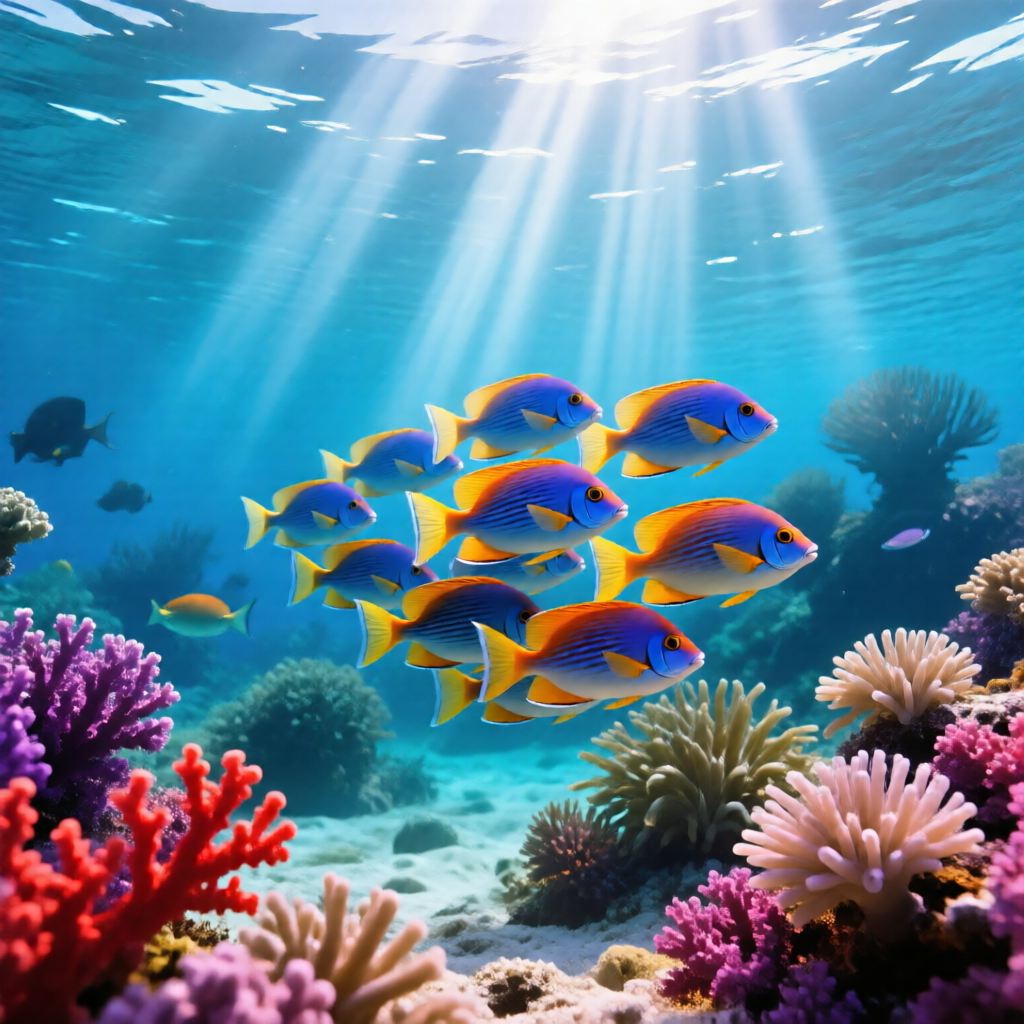
A close-up of a school of colorful tropical fish swimming in a stream-like formation through a beautiful, light-filled coral reef. The fish school shimmers with dazzling gradients of blue, yellow, and orange, moving gracefully as one, synchronously changing direction. The surrounding coral reef is highly diverse, with a mix of vibrant red, purple, and pink hard corals, as well as soft, swaying underwater plants and anemones. Beams of sunlight pierce the water's surface, creating shafts of light that cascade into the depths, lending the scene a mystical atmosphere. The water is exceptionally clear, and in the distance, faint, blurred silhouettes of other corals and marine life are subtly visible. This scene captures a serene yet vibrant underwater world, filled with the tranquility of the seabed and the lively energy of its inhabitants.
windowsの絵文字も使えます。
英文、中国語が画像に反映されます。
なんでもできそうです。
ポスター、広告、レポート、課題制作などなど。
無料で使えます。
高価なGPUは必ずしも必要としません。
あとは、みなさんの知恵次第です。
AI画像生成の革命がおこりました。
推奨画像サイズ?
1664×928
1584×1056
1472×1104
1328×1328
縦横比を交換すれば8通り。
今回は、早く済ませたいので1024で作ってみました。
特に問題ありませんでした。
Qwen2-VL / Qwen-Image 系モデル特有のアーキテクチャ設計の影響で、「64の倍数」ではなく「14の倍数(正確には14×パッチ数)」
理由
- パッチサイズが16ではなく14ベース
- Stable Diffusion系は通常、解像度を 64 の倍数に合わせます。これは 8×8 ダウンサンプリング(VAE+U-Net)構造のためです。
- Qwen-Image は Vision Transformer (ViT) 系構造で、入力画像を固定サイズの パッチ(例: 14×14ピクセル) に分割して処理します。
- このため、入力サイズは「パッチサイズ × パッチ数」という形になり、64の倍数ではなく14の倍数に揃える必要があります。
- 推奨サイズはトレーニング時のアスペクト比セット
- モデルは訓練時に、様々なアスペクト比ごとに「パッチ数の組み合わせ」を固定して学習しています。
- 例えば 1664×928 は (14×119) × (14×66) の組み合わせに対応。
- こうすることで、高解像度でもアスペクト比を崩さずに処理可能。
- 1024が使われない理由
- Qwen-Image では 1024×1024 のような「SD的な正方形サイズ」での事前学習が少なく、 代わりに「14の倍数で効率的にViTを回せる解像度」を優先して学習しているため、 1024は最適化されていない場合が多いです。
まとめ
- Qwen-Image の解像度は 14の倍数(パッチサイズ起点)で決まる
- 推奨サイズは学習時のパッチ配列を再現したもの
- 64の倍数ではないのは、SD系ではなく ViT系の設計思想 だから
Qwen-Image-Lightning-8steps-V1.1.safetensors
RTX-3060 Laptop 6GB, RAM 32GB
Workflow4
Prompt
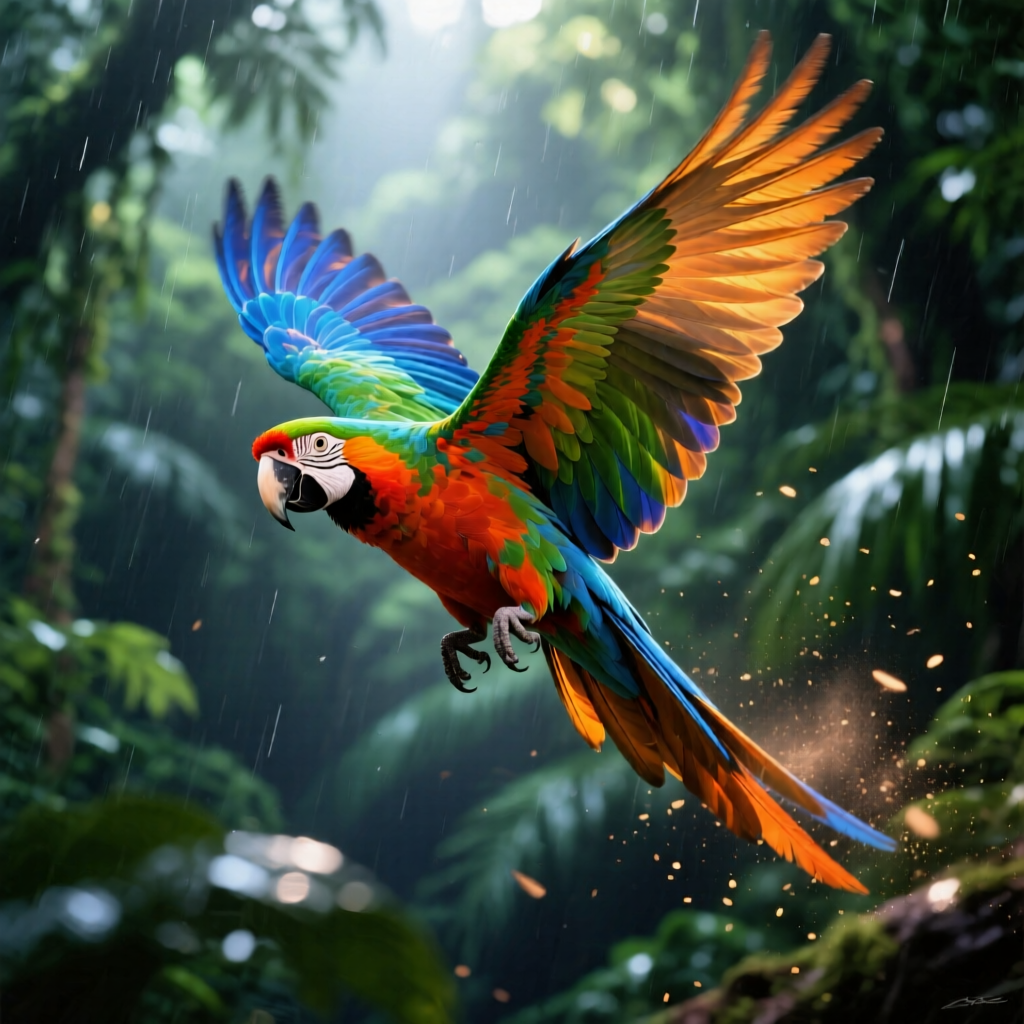
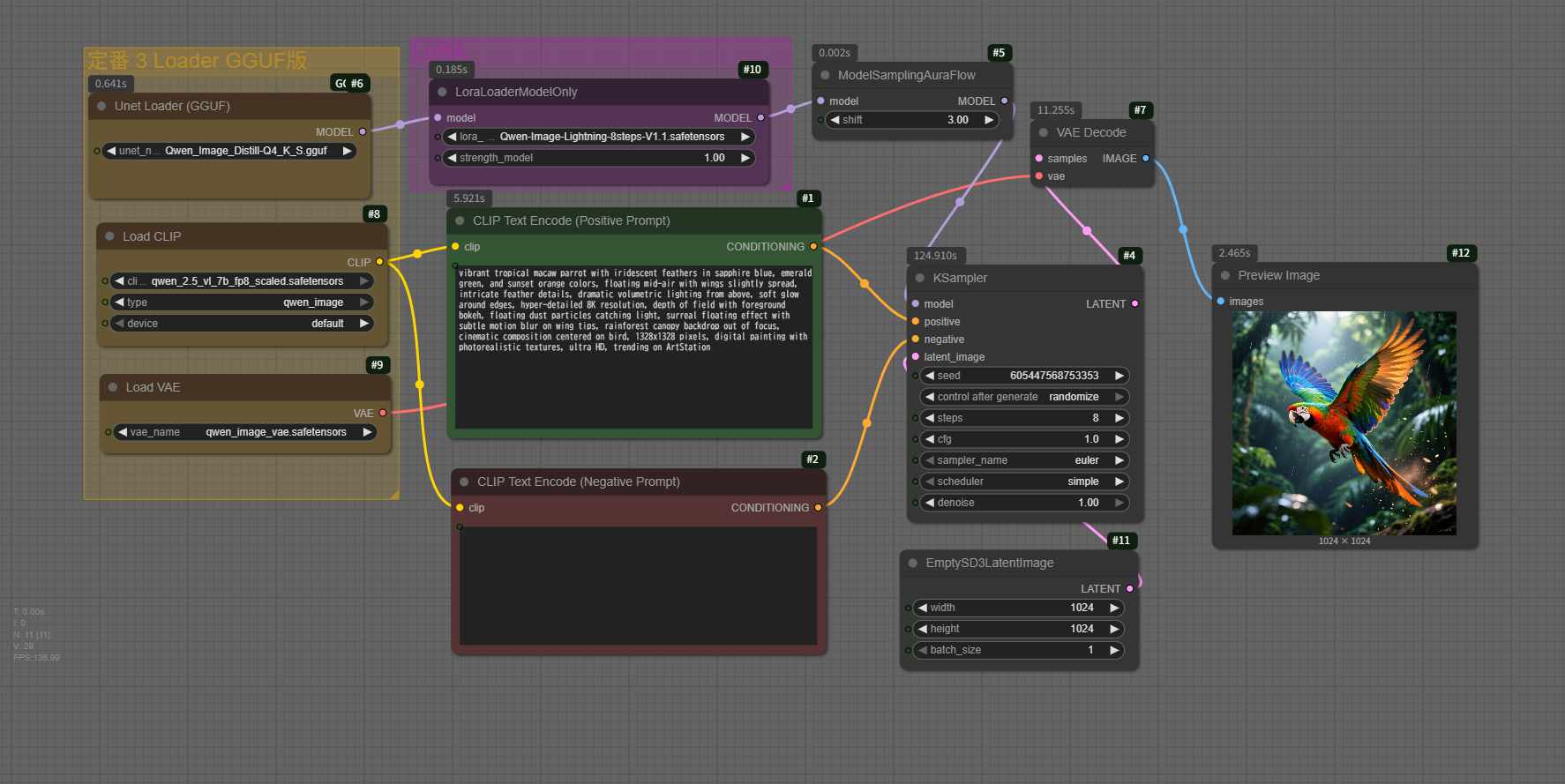
vibrant tropical macaw parrot with iridescent feathers in sapphire blue, emerald green, and sunset orange colors, floating mid-air with wings slightly spread, intricate feather details, dramatic volumetric lighting from above, soft glow around edges, hyper-detailed 8K resolution, depth of field with foreground bokeh, floating dust particles catching light, surreal floating effect with subtle motion blur on wing tips, rainforest canopy backdrop out of focus, cinematic composition centered on bird, 1328x1328 pixels, digital painting with photorealistic textures, ultra HD, trending on ArtStation